Live demo · Built by TECHMA
Scholarship management software for funds and foundationsEvery scholar, every payment, one register.
ScholarDesk is the portal a scholarship fund runs on after the award is made. Students send their payment requests and semester reports. Coordinators review, approve and record each payment, and always know what is left to pay.
One click, no account. Open the coordinator desk or a student file; the data is fictional and nothing you change is kept.
- Request types
- 4Tuition, living, study abroad, emergency
- Steps to payment
- 4Sent, in review, approved, paid
- Languages
- 2English and French, on every screen
- Sign-up
- 0The demo opens in one click
01The problem
The award is the easy part.
After the ceremony come four years of invoices, bank details, transcripts and due dates. Most funds run that part from a spreadsheet and an inbox.
Requests arrive everywhere
An invoice by e-mail, a photo by text message, a reminder by phone. Someone copies each one into a spreadsheet and hopes nothing was missed.
Nobody sees the whole
How much is approved but not paid? Which university is owed the most? Answering takes an afternoon of filters and formulas.
Students are left guessing
A student sends an invoice and hears nothing until the money arrives, or does not. They write again, and the inbox grows.
02The register
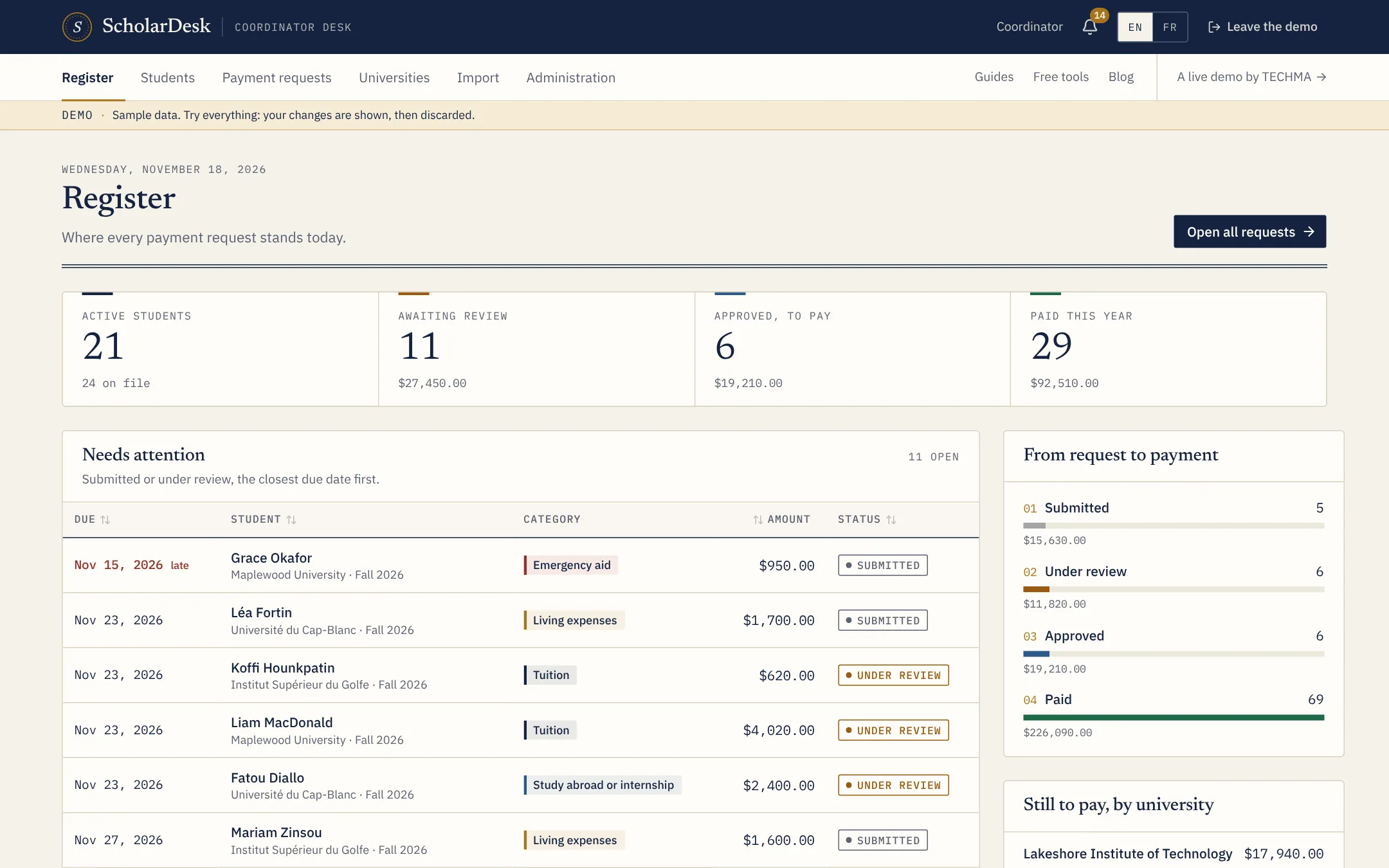
Everything after the award, in one app
Each part is useful on its own. Together they give the coordinator and the student the same picture.
- 01Payment requestsEvery request of the fund in one list, by status, type and due date.
- 02Review and paymentCheck the invoice, approve, record the payment and keep the note.
- 03Student filesOne file per scholar: studies, contact, bank details and payment ledger.
- 04Semester reportsAverage, credits, transcript, wellbeing and reflections, sent with each request.
- 05Universities and semestersA page per school with its semester calendar and degree programs.
- 06Import and exportBring in students, universities and past payments from a spreadsheet.
- 07Student portalStudents send requests and follow them, on a computer or a phone.
- 08Alerts and coordinatorsDue dates, low averages and emergency requests raise an alert.
- 09The registerWhat is in review, approved, paid, and left to pay by university.
For the coordinator
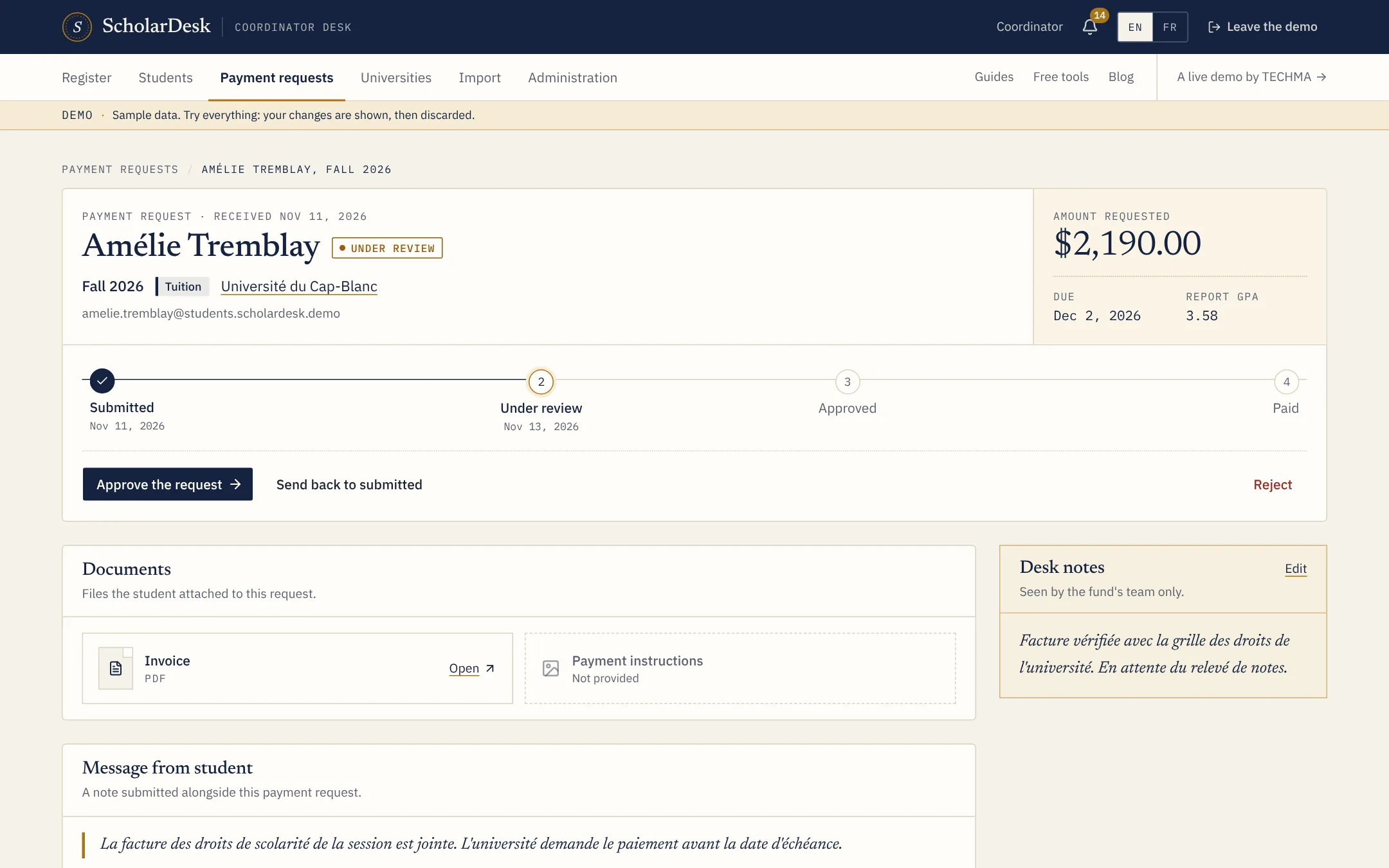
Each request, from received to paid
A request opens as one sheet: the amount, the due date, the invoice, the bank account to pay and the student's semester report.
- Approve, send back to review or refuse, with a note
- Record the payment with its date, amount and reference
- The oldest due dates always come first
For the student
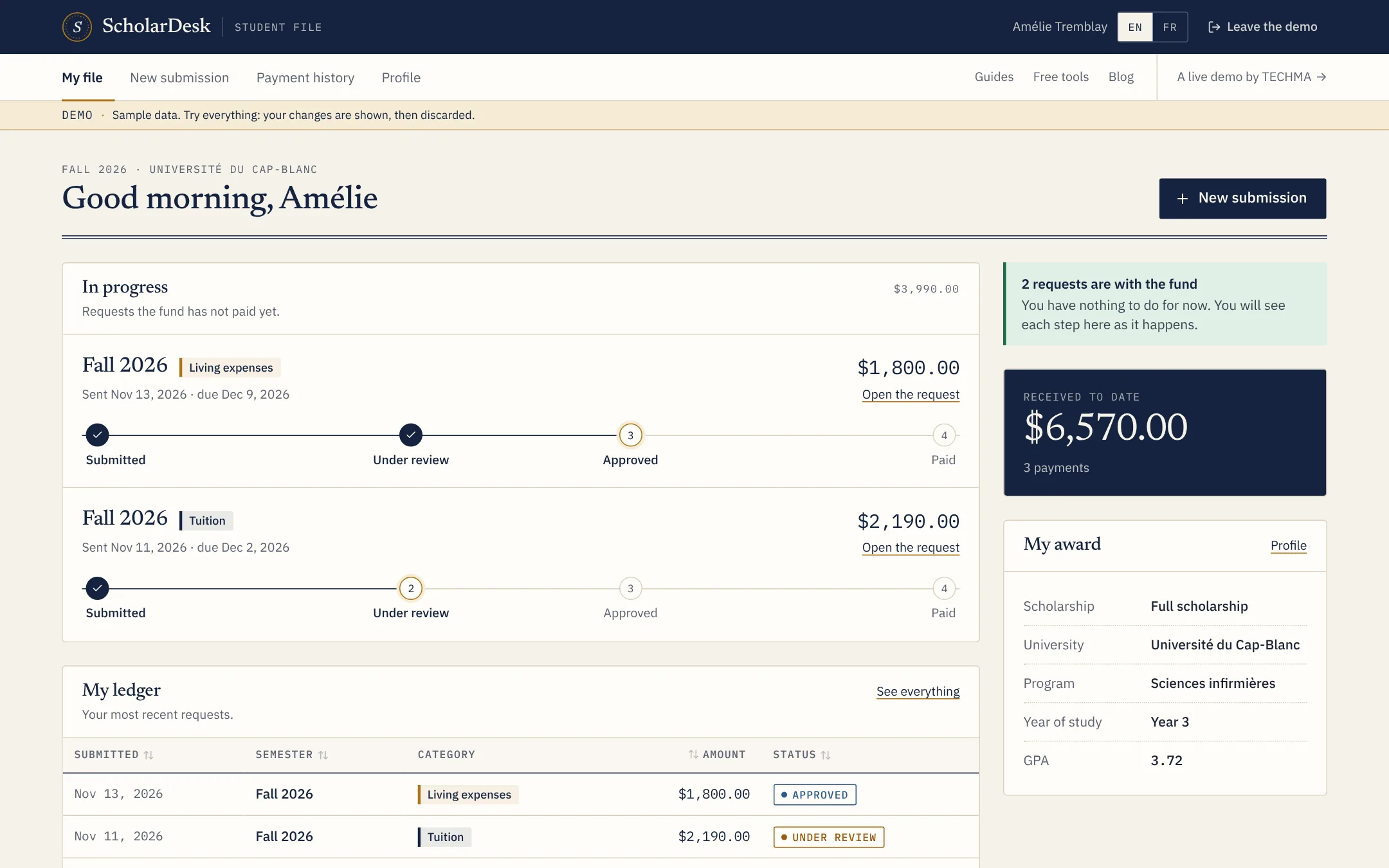
A file they can read without calling you
Each student sees their requests in progress, what has been paid to date and what the fund still needs from them.
- A three-part form: session, payment, semester report
- The status of every request, step by step
- Works on a phone, with a tab bar under the thumb
For the fund
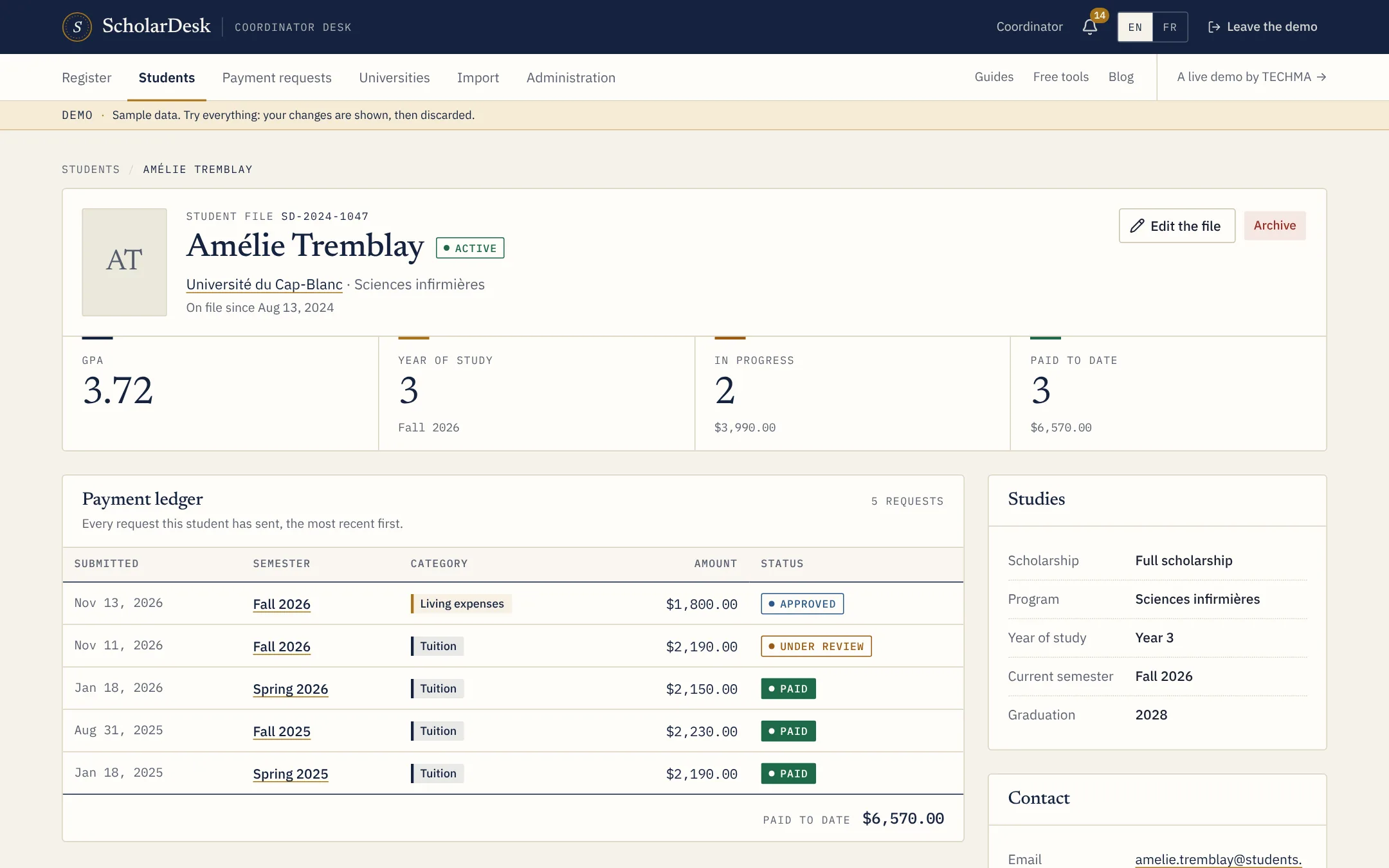
Students and universities, kept in order
A file per student, a page per university with its semesters and programs, and a spreadsheet import that checks every row.
- Scholarship type, year of study, average and status
- Semesters that open and close for requests
- Excel and CSV exports of what is on screen
03The path
Four steps, the same for every request
The student and the coordinator see the same four steps, so nobody needs to ask where things stand.
- 1
Sent
The student sends the amount, the due date, the invoice and the semester report.
- 2
In review
The coordinator checks the invoice against the award and the report.
- 3
Approved
The request is accepted and waits for the next payment run.
- 4
Paid
The payment is recorded with its date and amount. The student sees it at once.
04The funds
Made for organizations that pay scholarships
Private foundations
A family or private foundation that follows its scholars for years.
Read more02Community foundations
Several funds and donors, one team paying all the awards.
Read more03Corporate programs
A company that funds employees' children or students in its field.
Read more04Non-profits and NGOs
Organizations that sponsor students as part of a wider mission.
Read more05Associations
Alumni, professional and community associations that give awards.
Read more06Schools and universities
An aid office that pays awards funded by donors.
Read more05The offer
This is real software. Your fund can have it.
ScholarDesk is one of the applications TECHMA has built for clients. If it fits your program, there are three ways to get it.
Buy the source code
You get the code of the app and run it yourself.
On quote
- Full source code of the application
- Setup instructions for your developers
- Host it where you want
- No licence per student or per coordinator
TECHMA builds yours
We start from ScholarDesk and shape it around your program.
On quote
- Your request types, reports and approval steps
- Applications and selection, if you need them
- Connections to accounting and your donor tools
- Training for your team and import of your data
Managed for you
TECHMA hosts, updates and supports the app. You use it.
On quote
- Hosting, backups and updates included
- Support when something is unclear
- Changes made on request
- One monthly invoice
06The notes
From the coordinator's desk
A payment request process that holds
The five decisions to make once, so every term runs the same way.
Read more02Planning a disbursement schedule
Spread an award over terms and know what each month will cost.
Read more03Following academic progress
What to ask each term, and what to do with the answers.
Read more07Free tools
Calculators, checklists and text builders
Small tools for the questions every fund and every student asks. Free, no account, and what you type stays in your browser.
Cost of attendance calculator
Free calculator: add tuition, fees, housing, food and transport to estimate the cost of a year of study and what is left to cover after aid.
Read more02GPA calculator
Free GPA calculator: choose the grade and credits of up to five courses and get your term average on a 4.0 scale. No account needed.
Read more03Grade scale converter
Free converter: enter an average on one grading scale and see its proportional equivalent on another. Useful for scholarship files across countries.
Read more04Award letter builder
Fill in the award, its conditions and how payments work, and get a clear scholarship award letter to copy, download or print. Free, no account.
Read more05Disbursement calculator
Free calculator: split a yearly scholarship into payments per term, see the tuition and living parts and the total commitment over the years.
Read more06Fund budget calculator
Free calculator: from a yearly budget, an average award and the shares kept for running costs and emergencies, see how many scholars a fund can support.
Read more08The library
Articles, definitions and comparisons
What we have written to help a scholarship program get organized, whether or not it ends up using ScholarDesk.
Questions
Asked before the first call
What is ScholarDesk?
ScholarDesk is a web application for organizations that pay scholarships over several terms. Students have a file, send payment requests with their invoice, and report on each semester. Coordinators review the requests, approve them, record the payment and follow every student and university in one place.
Can I try it without creating an account?
Yes. The live demo opens in one click, as a coordinator or as a student. Everything in it is fictional, and any change you make is shown to you and then discarded, so you can try every button.
Who built ScholarDesk?
TECHMA designed and built it as a custom application for a scholarship program. The client's name and data are not shown. What you see is the same software with sample data and a new name.
Does it handle applications and selection?
No. ScholarDesk starts once a student has been awarded a scholarship: files, payment requests, semester reports and payments. An application and selection step can be added in a version built for your fund.
Does it send the money?
No. The fund pays through its own bank, then records the payment in ScholarDesk with its date, amount and note. The app keeps the register; it does not move money.
Is it available in French?
Yes. Every screen of the app exists in English and in French, and each person chooses their language.
Can our fund get this app?
Yes, in three ways: buy the source code, have TECHMA adapt it to your program, or let TECHMA host and manage it for you. The options are on the Get this app page; prices are on quote.
Live demo
Judge it on what it does.
ScholarDesk is a working application, not a mock-up. Open the coordinator desk, approve a request, record a payment, then switch to a student file and send one yourself.